Bomomo is a free browser art tool that turns simple motion into abstract images, playful experiments, and quiet creative calm.
Bomomo is a free, browser-based drawing tool for making abstract art with playful brushes and patterns. It is simple to use, easy to save, and built for experimentation rather than precision.
The first time I opened Bomomo, I expected a tidy little drawing app. What I got felt more like a weather system with a cursor inside it. I moved the mouse, and the screen answered back with loops, bursts, and drifting marks that seemed to have their own temperament.
That is the strange charm of Bomomo. It is not trying to be a serious studio tool. The official site presents it as a browser art playground created by Philipp Lenssen in 2008, with an IExplorer version by Nikolai Kordulla, and it lets you save what you make. It is also described elsewhere as a free online drawing tool with fun brushes and patterns that needs no downloads or installations.
What makes it linger in the mind is not polish. It is permission. Permission to make something unruly. Permission to stop aiming for perfect. Permission to see what happens when control gives way a little.
What Bomomo actually is
Bomomo is best understood as an abstract browser art tool, not a traditional paint program. You do not go there to sketch a portrait or draft a logo. You go there to discover what your movement looks like when it gets translated into color, motion, and pattern. Rron Nushi describes it as a free online drawing tool with fun brushes and patterns, and notes that it requires no downloads or installations.
That detail matters more than it sounds like it should. No installation means no pause. No setup means no friction. The site invites a more instinctive kind of making, the kind where you begin before your brain has finished negotiating with itself. That is part of why Bomomo feels less like software and more like a small experiment.
Bomomo’s own page also gives away something important about its identity: it is meant to be playful, open, and personal. The site says that you can do anything with the image you create. In practice, that means the result belongs to the person who made it, even if the process was half accident and half discovery.
A tiny creative history
The official site credits Bomomo to Philipp Lenssen in 2008, with an IExplorer version by Nikolai Kordulla. That alone places it in an earlier, more playful era of the web, when browser toys often felt like little acts of rebellion against the seriousness of desktop software.
That older web spirit is part of Bomomo’s appeal. It does not ask you to think in layers, masks, or export workflows first. It asks you to move. Then watch. Then react. The order feels backwards in a good way.
How Bomomo works
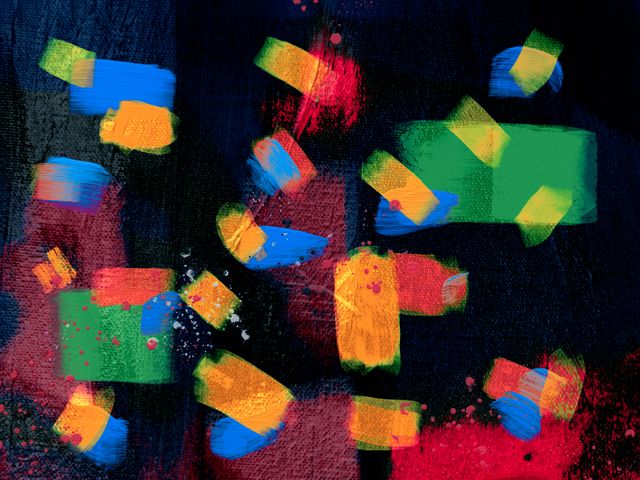
Bomomo is built around motion. You move the cursor, and the canvas turns that movement into abstract marks. The result can look delicate, chaotic, mechanical, or strangely organic, depending on how you move and how long you stay with it. It is a brush that behaves more like a mood than a tool.
That is why the experience can feel almost conversational. You try one motion. The screen gives you something back. You try a different one. The response changes. In that sense, Bomomo behaves less like a blank page and more like a responsive surface that is always negotiating with you.
The save system is also part of the experience. The official site includes “save normal” and “save high quality,” along with a note to rename the high-quality version to *.png. iLearn Technology adds the practical detail that normal saves as a JPG and high quality saves as a PNG image. Those are small details, but they matter, because they turn a quick experiment into something you can keep.
“free online drawing tool with fun brushes and patterns”
“Normal saves as a jpg and high quality saves as a png image.”
“bomomo created by Philipp Lenssen 2008”
Those lines are useful because they capture the whole shape of the product in one glance: browser-based, playful, and easy to save. Not complicated. Just inviting.
Why Bomomo still works
Bomomo lasts because it lowers the stakes. The site does not demand a masterpiece, and that absence of pressure is unexpectedly powerful. You can arrive with no plan, no reference, no artistic confidence, and still leave with something worth looking at.
Gamified Classroom describes Bomomo as a simple online art game where students create colorful abstract drawings by moving the mouse or finger across the canvas. That classroom framing reveals a lot. It is not just a tool for artists. It is a tool for attention, curiosity, and safe experimentation.
I think that is the real reason people keep finding their way back to it. Bomomo is useful when you need a break from perfection. It is useful when you want to start making before you know what you are making. It is useful when “messy” is not a problem but the point.
There is also a subtle emotional benefit here. Abstract art can be intimidating when it feels academic, but Bomomo strips that anxiety away. You are not decoding a theory. You are noticing what happens when line meets motion. That is a gentler entry point, especially for beginners, students, and anyone who has been staring at a blank screen too long.
Bomomo in classrooms and creative warm-ups
Bomomo has shown up in classroom resources for years because it is easy to use, fast to understand, and surprisingly rich for conversation. iLearn Technology suggested using it for desktop images, abstract art lessons, descriptive writing, and even CD cover ideas. That range is telling. It is not just an art site. It is a prompt generator.
For teachers, the value is simple: it creates visible thinking. Students can describe what each tool does, compare results, and explain how movement changed the picture. That turns art into language, observation, and reflection. For students, the win is even simpler: they get to make something that looks alive without needing advanced technique.
Bomomo also fits moments that are easy to overlook. Early finishers need something calm but not boring. Creative warm-ups need something that starts quickly. Brain breaks need something that resets attention without turning into noise. Bomomo slips into those spaces naturally. It does not compete with the moment. It occupies it.
Bomomo versus other browser art tools
Bomomo sits in a small but interesting category of browser-based creative tools. Compared with more conventional drawing apps, it is looser and less precise. Compared with AI art tools, it is more hands-on and more immediate. Compared with export-heavy sketch platforms, it is lighter and more playful.
| Tool | Core experience | Best for | Main difference |
| Bomomo | Free online drawing tool with fun brushes and patterns | Quick abstract doodles and pattern play | No downloads or installations; highly experimental |
| Sketchpad | Online drawing app with export options like JPEG, PNG, SVG, and PDF | Traditional digital drawing and file export | More conventional workflow and broader output control |
| Canva AI Art Generator | Free AI-powered text-to-art tool | Prompt-based image creation | Less about hand movement, more about text prompts |
That contrast is the point. Bomomo is not trying to win the feature race. It is trying to keep the door open between intention and accident. And sometimes that is more valuable than precision.
FAQ
What is Bomomo?
Bomomo is a browser-based abstract drawing tool that turns movement into colorful patterns and playful shapes.
Is Bomomo free?
Yes. It is described as a free online drawing tool.
Do I need to install anything?
No. Bomomo works in the browser and requires no downloads or installations.
How do I save Bomomo art?
The site includes save options for normal and high quality output, and the high-quality version is saved as PNG.
Who made Bomomo?
The official site credits Bomomo to Philipp Lenssen in 2008, with an IExplorer version by Nikolai Kordulla.
Key Takings
- Bomomo is a free browser art tool built for abstract, playful creation.
- It was created by Philipp Lenssen in 2008, with an IExplorer version by Nikolai Kordulla.
- Its save options make it easy to keep finished work as JPG or PNG.
- Bomomo works well for quick doodles, classroom warm-ups, and low-pressure creativity.
- It stands out because it feels more like a responsive experiment than a standard drawing app.
- The tool’s simplicity is part of its charm. It removes friction and leaves room for surprise.