Discover how a web ar web design template helps create immersive, interactive experiences that engage visitors and boost conversions.
A web ar web design template is a pre-designed website framework built to support Web Augmented Reality (WebAR) experiences directly in a browser. It helps designers and businesses create interactive AR experiences without requiring users to download a mobile app.
WebAR combines traditional web design with augmented reality technology, allowing visitors to engage with products, environments, and digital content in real-world spaces through their smartphone cameras.
The first time I encountered a WebAR experience, it felt strangely ordinary for about three seconds.
I opened a website on my phone, expecting another product page. Instead, a life-sized digital object appeared on my living room floor. No app download. No complicated setup. Just a browser and a camera.
That moment revealed something interesting. The future of web design might not arrive through dramatic revolutions. It may quietly emerge through experiences that blur the line between screens and reality.
A web ar web design template sits at the center of that transformation.
For designers, developers, marketers, and business owners, these templates are becoming the bridge between traditional websites and immersive digital experiences. They simplify the process of creating augmented reality interfaces while maintaining the accessibility and reach of the web.
What makes them fascinating isn’t merely the technology. It’s the shift in how people interact with information. Instead of viewing content, visitors can step into it.
Let’s explore what that means, why it matters, and how modern WebAR templates are reshaping digital experiences.
What Is a Web AR Web Design Template?
A web ar web design template is a website design framework specifically created to support browser-based augmented reality experiences.
Unlike conventional website templates, these designs incorporate AR functionality, camera integration, 3D content placement, and interactive user journeys.
Core Components of a WebAR Template
Most modern WebAR templates include:
- Responsive layouts
- AR activation buttons
- Camera permission workflows
- 3D object viewers
- Product visualization modules
- Interactive animations
- Mobile-first optimization
- Fast-loading assets
Think of a traditional website as a window.
Think of a WebAR website as a doorway.
One allows people to look at information. The other allows them to interact with it.
A Simple Example
Imagine shopping for furniture online.
A traditional website shows photographs.
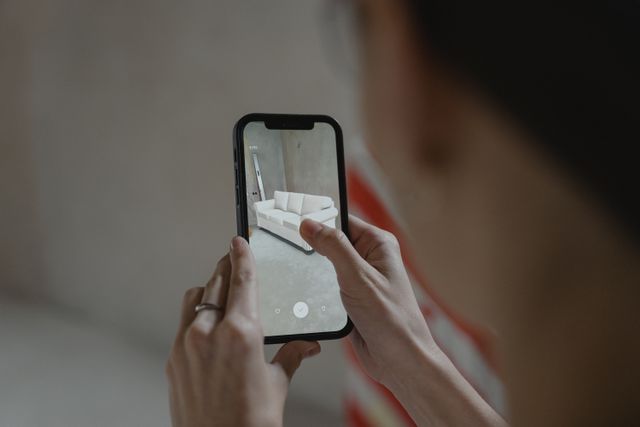
A WebAR template lets visitors place a virtual sofa inside their living room before purchasing.
The difference is subtle in concept but enormous in impact.
Why WebAR Is Changing Modern Web Design
For years, websites have focused on delivering information.
Today, users increasingly expect experiences.
That expectation is driving the rise of WebAR.
The Shift From Viewing to Experiencing
Consumers no longer want to imagine how something looks.
They want proof.
They want context.
They want interaction.
A WebAR website satisfies all three.
Instead of reading specifications for a pair of glasses, users can virtually try them on.
Instead of viewing a product image, they can see the product on their desk.
The website becomes a testing environment rather than a brochure.
Quotable Insight
“WebAR removes friction by eliminating the need for dedicated mobile applications.”
Another Important Fact
“Browser-based AR experiences can be launched instantly through a simple URL.”
These two factors explain much of WebAR’s growing popularity.
Key Features Every Web AR Web Design Template Should Include
Not all templates are created equally.
Some simply add an AR button to an existing design.
The best ones rethink the entire user experience.
Mobile-First Architecture
Most WebAR interactions occur on smartphones.
A strong template prioritizes:
- Touch-friendly navigation
- Fast loading times
- Adaptive layouts
- Camera integration
Mobile optimization isn’t optional.
It’s foundational.
Seamless AR Activation
Visitors should be able to launch AR experiences with minimal effort.
Good templates reduce friction through:
- Clear calls to action
- Simple permissions
- Visual guidance
- Fast initialization
Every extra step reduces engagement.
3D Asset Optimization
AR experiences rely heavily on 3D content.
An effective template supports:
- Compressed 3D models
- Fast rendering
- Efficient loading
- High visual quality
Large assets may look impressive but can significantly slow performance.
Interactive User Journeys
The strongest WebAR designs guide users naturally.
Instead of overwhelming visitors with technology, they introduce AR progressively.
For example:
- Product overview
- Feature explanation
- Interactive demo
- AR visualization
- Purchase action
This progression feels intuitive rather than technical.
Industries Using Web AR Web Design Templates
One surprising discovery is how broad WebAR adoption has become.
It’s no longer limited to technology companies.
E-Commerce
Retailers use WebAR to:
- Display products in real environments
- Reduce purchase uncertainty
- Improve buyer confidence
- Lower return rates
A customer who knows exactly how a product looks is less likely to return it.
Real Estate
Property developers increasingly use WebAR to:
- Showcase future developments
- Create virtual walkthroughs
- Visualize interior layouts
- Present architectural concepts
Blueprints become experiences.
Education
Educational websites use AR to:
- Visualize scientific concepts
- Demonstrate historical artifacts
- Create interactive lessons
- Improve engagement
Learning becomes participatory.
Healthcare
Medical organizations use WebAR to:
- Explain procedures
- Demonstrate anatomy
- Train professionals
- Improve patient understanding
Complex information becomes easier to understand.
How a Web AR Web Design Template Improves User Experience
User experience is often discussed as if it were a checklist.
Faster pages.
Better navigation.
Cleaner design.
Those elements matter.
But WebAR introduces something deeper.
Presence.
Creating Emotional Engagement
When users place a virtual object in their environment, they become participants.
They’re no longer observing.
They’re involved.
This creates stronger emotional connections.
Reducing Decision Anxiety
Many purchasing decisions involve uncertainty.
Will it fit?
Will it look right?
Will it match?
WebAR answers those questions visually.
Quotable Insight
“The most effective digital experiences reduce imagination requirements and increase certainty.”
That single principle explains much of WebAR’s effectiveness.
Essential Design Principles for WebAR Templates
Technology alone doesn’t create great experiences.
Design still matters.
Perhaps more than ever.
Keep Interfaces Minimal
AR is already attention-grabbing.
Adding excessive interface elements creates confusion.
Successful templates often use:
- Clean layouts
- Simple navigation
- Focused interactions
- Clear visual hierarchy
Guide User Behavior
Many visitors are unfamiliar with AR experiences.
Templates should provide:
- Visual instructions
- Onboarding prompts
- Contextual tips
- Progress indicators
Small guidance cues can dramatically improve engagement.
Prioritize Speed
Users expect instant results.
Slow AR experiences quickly become frustrating.
Optimized templates focus on:
- Asset compression
- Lazy loading
- Efficient rendering
- Performance monitoring
The best AR experience is often the one users barely notice loading.
Comparison: Traditional Web Templates vs Web AR Templates
| Feature | Traditional Template | Web AR Template |
| Product Viewing | Static Images | Interactive 3D Visualization |
| User Engagement | Passive | Active |
| Mobile Experience | Standard Navigation | Camera-Based Interaction |
| Customer Confidence | Moderate | High |
| Technology Complexity | Lower | Higher |
| Conversion Potential | Good | Often Higher |
| Memorability | Average | Strong |
The contrast isn’t merely technical.
It’s experiential.
Choosing the Right Web AR Web Design Template
Selecting a template involves more than visual preference.
The best choice depends on objectives.
For E-Commerce
Look for:
- Product visualization
- AR product placement
- Conversion-focused layouts
- Mobile optimization
For Real Estate
Prioritize:
- 3D model support
- Virtual tours
- Interactive floor plans
- Large-screen responsiveness
For Education
Focus on:
- Interactive learning modules
- Visual demonstrations
- Multimedia support
- Accessibility features
The ideal template supports goals rather than simply showcasing technology.
Common Challenges and How to Solve Them
WebAR is exciting, but it isn’t without obstacles.
Device Compatibility
Not every smartphone supports advanced AR capabilities.
Solution:
- Offer fallback experiences
- Maintain traditional content paths
- Test across multiple devices
Large File Sizes
3D assets can slow websites.
Solution:
- Compress models
- Optimize textures
- Use content delivery networks
User Education
Some visitors may not understand how to launch AR experiences.
Solution:
- Add onboarding instructions
- Use intuitive icons
- Provide visual demonstrations
Technology succeeds when it feels invisible.
The Future of Web AR Web Design Templates
The most intriguing aspect of WebAR isn’t where it is today.
It’s where it’s heading.
As browser capabilities improve and devices become more powerful, WebAR experiences will become increasingly sophisticated.
Future templates may include:
- AI-powered personalization
- Real-time environment recognition
- Gesture controls
- Spatial commerce
- Collaborative AR experiences
The website of tomorrow may feel less like a page and more like a place.
That’s a subtle distinction.
But it’s a profound one.
FAQ Section
What is a web ar web design template?
A web ar web design template is a pre-built website design framework that supports browser-based augmented reality experiences without requiring users to install an app.
Do users need to download an app for WebAR?
No. WebAR experiences typically run directly within supported mobile browsers.
Is WebAR suitable for e-commerce websites?
Yes. Many online stores use WebAR to allow customers to visualize products in real-world environments before purchasing.
Can WebAR work on desktop devices?
Some experiences can work on desktops, but most WebAR interactions are optimized for smartphones and tablets with cameras.
Are Web AR web design templates difficult to customize?
Most modern templates are designed for customization and can be adapted to various industries, branding requirements, and user experiences.
Key Takings
- A web ar web design template combines traditional website design with browser-based augmented reality experiences.
- WebAR allows users to interact with digital content directly through their smartphone browser.
- Businesses use WebAR to improve engagement, increase confidence, and create memorable experiences.
- Mobile-first design is essential for effective WebAR implementation.
- Optimized 3D assets significantly improve performance and user satisfaction.
- WebAR templates are increasingly popular across e-commerce, education, healthcare, and real estate industries.
- The future of web design is moving toward immersive, interactive, and context-aware experiences powered by WebAR.